
Tin Can
TinCanParenting
3.859.00 Reviews
- Version
- 3.1.4
- Installs
- 10.00K
- Age Rating
- Everyone
Screenshots




Our Review of Tin Can
 Analysis by Appyee
I approached Tin Can as a parenting app with a simple question in mind: does it remain useful after the novelty of a new way to stay in touch wears off? TinCan’s app is a companion for its Tin Can phone, presenting the idea of a modern “landline” for friends rather than another general-purpose chat service. That immediately gives it a different feel from the messaging apps most families already use.
My first impression is that the appeal is easy to understand. A child can have a dedicated way to connect with friends without being dropped into the endless stream of group chats, social feeds and notifications that usually comes with a smartphone. At the same time, parents may appreciate a more focused communication setup. The important question, though, is whether that focus is enough to justify keeping another communication tool active over time.
What Tin Can feels like during the first week
The first week is where Tin Can has its strongest pull. The concept feels tangible and intentional: instead of asking a child to navigate a full phone ecosystem, the family is giving communication its own place. That can make the first conversations feel more meaningful, especially for younger users who are not ready for the responsibility or distraction of a conventional smartphone.
I also think the app’s personality comes from what it avoids. It is not trying to become a universal inbox, a social network or a replacement for every family communication tool. Its role is narrower, and that narrow role can be a benefit when a parent wants a child to stay connected with friends while keeping the experience easier to understand.
For a realistic everyday example, imagine a child coming home from school and wanting to talk with a nearby friend about playing later. With a normal messaging app, that conversation may sit beside school groups, family threads, alerts and unrelated content. A Tin Can setup is easier to frame: this is the place for that friend-to-friend connection. The reduced scope may help a child build a communication habit without having to learn an entire smartphone at the same time.
That does not mean the first setup will suit every household. The value depends on the people on the other end. If a child’s friends do not use the Tin Can phone or cannot be reached through the same arrangement, the experience may feel isolated. This is the central trade-off: the focused design is attractive precisely because it is less universal than ordinary texting or mainstream chat services.
The app is free, which lowers the barrier to trying it. TinCan is the developer, and the application belongs to the parenting category rather than entertainment or general messaging. Its age rating is Everyone, so the presentation is aimed at broad accessibility. I would still treat the age rating as a starting point, not a substitute for a parent deciding how and when a child should communicate.
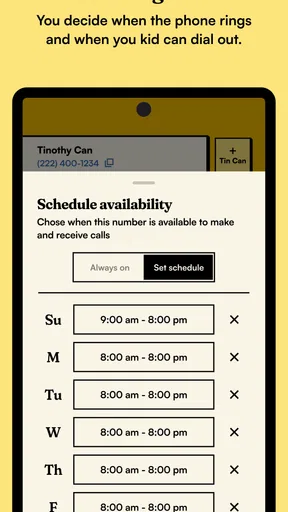
During the first week, I would recommend setting expectations before handing it over. Decide who the child is meant to contact, when the device should be available, and what happens if a friend does not respond. This is a small but important detail: a dedicated communication tool works best when the family agrees on its purpose instead of treating it as an automatic replacement for a phone.
Why the focused approach can work for children
The strongest use case is a child who needs a little independence but is not ready for unrestricted smartphone access. Tin Can can occupy the space between a parent-controlled household phone and a fully featured personal device. That middle ground is valuable because the decision is not always “no communication” versus “give the child everything.” A narrower tool can offer a gradual step.
It may also appeal to families that want friendships to feel less dependent on social platforms. A child can have a direct connection with a friend without needing to browse a feed or manage a public-facing profile. I would not describe that as a complete solution to digital distractions, but it is a thoughtful direction for parents who want communication to be more deliberate.
Another less obvious benefit is conversational context. Because the purpose is so specific, parents can talk with a child about practical communication skills: waiting for a reply, ending a conversation politely, choosing an appropriate time to call and understanding that a friend may not be available. Those lessons are easy to overlook when a child is simply handed a standard messaging account.
The limitation is that Tin Can is not the right choice for a child who needs broad access to classmates, school announcements, emergency contacts or family logistics in one place. A regular phone or established messaging service is more flexible for those needs. Tin Can makes more sense as a deliberately limited channel than as a complete communications hub.
What changes after the novelty fades
After the first few conversations, the central test becomes routine. A communication product earns its place when people remember to use it naturally, not only when they are excited by something new. In my view, Tin Can’s long-term value depends on whether the child has a stable circle of friends who can participate and whether the family finds the dedicated format genuinely easier than existing alternatives.
For some households, the answer may be yes. A child who regularly talks with one or two friends could find the arrangement comfortable, especially if those conversations fit into an established after-school routine. The app then becomes part of a predictable pattern rather than a novelty item that is opened a few times and forgotten.
For other families, ordinary messaging will gradually win through convenience. Friends may already be reachable through services the household uses every day, and adults may not want to coordinate an additional channel. That is not a flaw in the idea so much as a practical consequence of choosing a more specialized system. The more people involved, the more important compatibility and habit become.
One useful way to judge the month-to-month value is to ask whether Tin Can solves a recurring problem. If the recurring problem is “my child needs a simple way to talk with selected friends without a full smartphone,” the app has a clear purpose. If the problem is “we need every kind of communication in one place,” it will probably feel restrictive.
I would also pay attention to whether the child initiates use independently. If every conversation requires a parent to remind the child, arrange the contact or explain the process again, the maintenance burden may outweigh the benefit. A good family tool should eventually become understandable enough that it does not need constant adult supervision for ordinary use.
Maintenance is part of the product
The maintenance burden here is less about technical complexity and more about keeping the communication circle active. Parents need to know which friends are part of the child’s regular routine and whether those friendships are still active. When a child changes classes, moves activities or simply grows apart from someone, a dedicated communication setup can require a little housekeeping.
That is one of the trade-offs that may not be obvious from the short store description. A general messaging app absorbs those changes into an existing contact list. A focused device and companion app ask the family to think more deliberately about who belongs in the child’s communication world. Some parents will see that as healthy structure; others will experience it as another small task.
I would build a quick check into an existing family routine rather than treating it as a separate project. Once in a while, ask the child who they still talk to, whether the device is being used, and whether any conversations feel uncomfortable or confusing. This is not about monitoring every exchange. It is about making sure the tool still matches the child’s life instead of quietly becoming unused equipment.
Another practical habit is to keep the purpose visible. If Tin Can is meant for close friends, do not let it become an accidental substitute for every family update. If it is intended as a first step toward independent communication, revisit the boundaries as the child matures. The setup should evolve with the child rather than remain frozen because it was once convenient.
The current version is 3.0.1, and the app requires Android 7.0 or later. That makes device compatibility worth checking before planning around it, particularly in households that keep older phones for children. The app is available at no purchase cost, but the broader setup still depends on having the relevant Tin Can phone arrangement and people to communicate with. Free software does not automatically mean zero effort or zero equipment considerations.
Where fatigue can appear
The first source of fatigue is duplication. If parents and children already have an easy, trusted way to reach one another, adding Tin Can may create one more place to remember. The same message can become split across systems, and the simplicity promised by a dedicated channel can be lost if the family keeps checking several apps anyway.
The second is social friction. Children do not choose communication tools in isolation. Their friends’ habits matter. A beautifully focused system can become frustrating if a child repeatedly has to explain how to reach them or discovers that the people they want to contact are using something else. This is the main reason I would test the social fit before committing emotionally to the concept.
The third is the possibility of outgrowing it. A child may initially benefit from a limited communication space but later need broader access for school, activities or family coordination. Tin Can can be a useful stage in that progression, but I would not force it to remain the only communication method once the child’s needs have clearly changed.
There is also a difference between reducing distractions and reducing necessary context. A narrow tool can protect attention, but it may not carry the same convenience as a normal smartphone when plans change quickly. Parents who need immediate flexibility across many contacts may prefer a conventional phone with carefully managed settings. Tin Can is better suited to intentional, bounded connection than to complex daily logistics.
The public response suggests a modest but real audience: the app has an average rating of 3.9 from around sixty ratings, with over fifty written reviews and more than ten thousand installs. I read that as evidence of interest rather than proof that it will fit every household. The concept is distinctive enough to attract families looking for an alternative, while the mixed rating is a reminder to judge it by your communication needs instead of by the idea alone.
How it compares with ordinary alternatives
Compared with standard texting, Tin Can is more specialized and potentially less distracting, but it is also less universal. Texting wins when the priority is reaching almost anyone quickly. Tin Can wins when the priority is creating a defined channel for a child’s friendships and keeping that channel separate from the rest of a phone’s functions.
Compared with a full smartphone, the difference is even clearer. A smartphone offers maps, school tools, cameras, browsers, social services and many other capabilities. That flexibility is useful, but it also creates more decisions and more opportunities for distraction. Tin Can is appealing for parents who want to delay that complexity while still giving a child some independence.
Compared with a family group-chat app, Tin Can appears better suited to direct friend connections than household administration. A family chat is practical for schedules, pickups and announcements. It is not necessarily the best environment for a child’s private conversations with friends. I would see the two approaches as complementary only if the family is comfortable maintaining both.
The important comparison is therefore not “which app has more features?” It is “which communication problem are you trying to solve?” If your goal is maximum reach, use the established tool everyone already has. If your goal is a more intentional first communication experience for a child, Tin Can has a more convincing reason to exist.
Who should try it, and who should skip it
I would recommend trying Tin Can for families with a child who wants to talk with a small, known group of friends, while the parents want to avoid handing over a general-purpose smartphone. It is especially interesting when the family values a clear boundary between communication and the wider digital world.
I would be more cautious if the child’s friends are unlikely to participate, if the household already struggles with too many communication channels, or if the child needs access to many contacts and services. In those situations, the focused design may feel like a limitation almost immediately.
I would also skip it as a solution to problems it was not designed to solve. It is not a substitute for teaching digital judgment, agreeing on family rules or talking with children about privacy and respectful communication. A simpler device can reduce exposure to distractions, but it cannot replace guidance.
For parents who do try it, my practical advice is to begin with a narrow purpose and a small circle. Give the child time to learn the rhythm of using it, then evaluate whether it is actually being used without constant prompting. If the conversations become a natural part of the week, the setup is earning its space. If it sits unused while everyone returns to ordinary messaging, the experiment has answered the question too.
My long-term verdict
After the initial novelty, Tin Can’s lasting value rests on discipline and social fit rather than on spectacle. The idea is strongest when a family wants a child-friendly bridge toward independent communication, not when it needs a universal replacement for phones and messaging services.
I like the restraint of the concept. A dedicated connection for friends can feel calmer and easier to explain than a full smartphone, and the parenting angle gives the app a clear reason to exist. At the same time, the narrow focus creates real obligations: the right friends need to be involved, the family needs to maintain the habit, and everyone must accept that another communication channel may sometimes be less convenient.
My recommendation is therefore conditional but positive. If you are deliberately looking for a limited, friend-focused communication experience and the Tin Can phone fits your family’s routine, this free companion app is worth exploring. If you mainly want convenience, broad compatibility or one place for every conversation, a normal messaging option will probably remain the better long-term choice.
For me, Tin Can earns lasting space only when it is treated as a purposeful stage in a child’s communication journey. Used that way, it can offer a thoughtful alternative to giving a child unrestricted access too early. Used without a clear routine or a participating circle of friends, it risks becoming another interesting idea that fades once the first-week excitement is gone.
Privacy and Permissions
See what permissions an app requests and how it handles your data.
- Contacts
- read your contacts, modify your contacts
- Location
- approximate location (network-based), precise location (GPS and network-based)
- Photos/Media/Files
- read the contents of your USB storage, modify or delete the contents of your USB storage
- Storage
- read the contents of your USB storage, modify or delete the contents of your USB storage
- Camera
- take pictures and videos
- Other
- view network connections, pair with Bluetooth devices, access Bluetooth settings, full network access, prevent device from sleeping, Google Play license check, read Google service configuration
Verdict
Strengths of Tin Can
- Simple interface makes creating and organizing notes quick.
- Works well for capturing short thoughts, lists, and reminders.
- Lightweight design uses minimal storage and device resources.
- Notes can be accessed quickly without navigating complicated menus.
- Useful for users who prefer a focused, distraction-free notepad.
Limitations of Tin Can
- Limited advanced formatting compared with full-featured note apps.
- May lack collaboration tools for sharing and editing notes with others.
- Organization options can feel basic for users with many notes.
- No built-in task management features for complex projects.
- Some features may depend on the device or operating system version.
Similar Picks in This Category
View All
Family Space
Motorola Mobility LLC.3.9

شرطة الأطفال - مكالمة وهمية
Oub Apps4.1

Findmykids: Parental Control
LETEM LTD4.6

Pregnancy + | Tracker App
Philips Electronics UK Limited4.8

Policía de niños - para padres
Kids police4.7

Pregnancy App
Amila4.9
Frequently Asked Questions
What is Tin Can, and what can I use it for?
Tin Can is a social and communication app designed for sharing messages, thoughts, media, or updates with other users, depending on the features available in your version. Its appeal comes from offering a more focused space for interaction than many large social networks. Before downloading, review the app’s current description and supported features, as functions may vary between Android and iOS releases.
Is Tin Can free to download and use?
Tin Can may be available as a free download, but some functions could require in-app purchases, a subscription, or additional payments. Users should check the store listing carefully before creating an account, especially for premium tools, advertising policies, or limits on usage. It is also worth reviewing the renewal terms if the app offers a recurring subscription.
Does Tin Can require an account or personal information?
The registration requirements depend on the version of Tin Can and the services it provides. You may be asked for information such as an email address, phone number, username, or profile details to access communication and social features. Before signing up, read the privacy policy and permissions list so you understand how your information may be collected, stored, and shared.
Is Tin Can safe for children and private conversations?
Parents should not assume that Tin Can is suitable for children simply because it is easy to download. Social and messaging apps can expose users to unknown contacts, shared content, or unwanted interactions. Check the official age rating, moderation tools, blocking and reporting options, and privacy settings. Avoid sharing sensitive information, location details, passwords, or private images through the app.
What devices and permissions does Tin Can support?
Tin Can’s availability and performance can differ depending on whether you use Android or iOS, as well as your operating-system version and device hardware. The app may request permissions for notifications, the camera, microphone, photos, contacts, or storage if those functions are included. Review each permission during installation and disable any access that is not necessary for the features you plan to use.
